On-chain Bitcoin Payments with the Lightning Pay Wallet
By Lightning Pay
On-chain bitcoin payments are the foundation of the Bitcoin network. They’re slower than Lightning payments, but they offer the highest level of security and final settlement.
The Lightning Pay Wallet supports full on-chain bitcoin sending and receiving, while helping you understand what to expect along the way.
This article explains how on-chain payments work in Lightning Pay, when to use them, and why waiting is a normal part of the process.
What on-chain payments are (and when to use them)
On-chain payments are standard Bitcoin transactions recorded directly on the Bitcoin blockchain.
They’re best suited for:
- Saving bitcoin
- Larger transfers
- Moving bitcoin between wallets or into long-term storage
- Situations where final settlement matters more than speed
On-chain payments are slower than Lightning payments by design. That trade-off is what gives Bitcoin its security and resistance to reversal.
Sending bitcoin on-chain
Sending bitcoin on-chain with the Lightning Pay Wallet is straightforward.
How to send bitcoin on-chain
- From the main screen, tap Send
- Scan a QR code, paste a Bitcoin address, or enter it manually
- Choose the amount
- Choose your fee rate
- Review and confirm the transaction
Once sent, the transaction is broadcast to the Bitcoin network and begins waiting for confirmations.
On-chain transactions include a network fee paid to Bitcoin miners. This fee isn’t paid to Lightning Pay — it goes to the Bitcoin network and varies depending on current activity.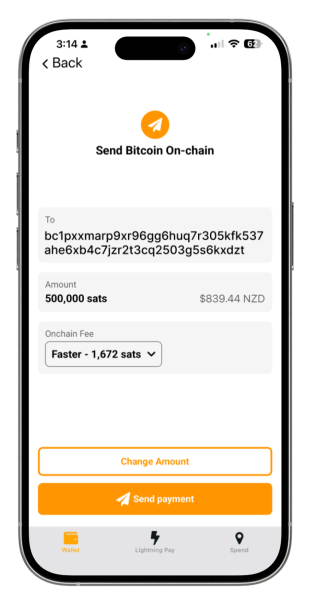
Receiving bitcoin on-chain
You can receive on-chain bitcoin into your Lightning Pay Wallet at any time.
The wallet provides you with a standard Bitcoin receive address. This address can be used with exchanges, other wallets, cold storage, or anyone sending you bitcoin.
How to receive bitcoin on-chain
- From the main screen, tap Receive, then choose On-chain
- The wallet will show you a Bitcoin address and QR code
- You can scan the QR code, copy the address, or share it using another app
Once bitcoin is sent to this address, it will arrive through the Bitcoin network.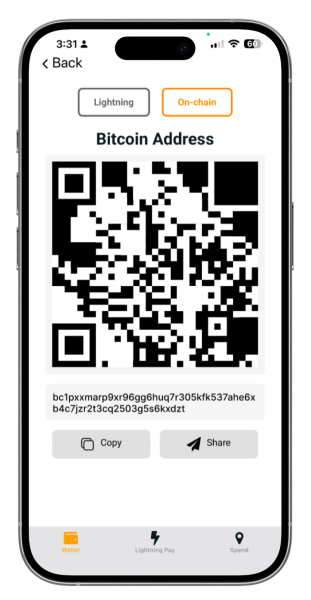
What happens after you receive bitcoin
This is the part that can feel unfamiliar if you’re new to Bitcoin.
When someone sends bitcoin to your on-chain address, the funds will not appear in your wallet immediately.
This is expected.
Bitcoin transactions must be confirmed by the network before they are considered settled. Until enough confirmations have occurred, the wallet may show nothing at all, or may show the transaction as pending.
If you’ve sent bitcoin and don’t see it yet, it does not mean anything has gone wrong.
Waiting is a normal part of using Bitcoin on-chain.
Choosing between on-chain and Lightning
The Lightning Pay Wallet supports two ways to move bitcoin because they serve different purposes.
On-chain payments are slower, highly secure, and best for saving and larger transfers.
Lightning payments are instant, very low fee, and best for everyday spending.
Both are bitcoin. The wallet helps you use the right tool for the situation.
The takeaway
On-chain bitcoin payments are an essential part of Bitcoin, and the Lightning Pay Wallet gives you full access to them.
If an on-chain payment takes time, that’s normal. If funds don’t appear immediately, that’s expected.
Bitcoin was designed to prioritise security and independence. The Lightning Pay Wallet helps you use those properties with clarity and confidence.